It's 2026, and every B2B SaaS company faces the same retention challenge: the last mile.
The last mile is the gap between what your software does out-of-the-box and what each customer actually needs. A manufacturing plant needs different safety checklists than a hospital. A property management company tracks different metrics than a food processing facility. This gap is why customers churn, why adoption stalls, and why your support team drowns in feature requests.
For decades, the solution was either "configure it yourself with our complex settings" or "pay us $50K+ for custom development that takes 3-4 months." Most customers did neither—they just lived with software that was 80% right, stayed on your lowest tier, and eventually churned to a competitor who promised better fit.
Why AI Finally Unlocks the Last Mile #
In 2026, AI changed the equation completely. What previously required weeks or months of engineering time now happens in seconds. UpKeep embedded Gigacatalyst into their CMMS platform, and suddenly every maintenance team could build exactly what they needed—custom dashboards, workflow automation, mobile inspection forms—without writing code or waiting on engineering.
This wasn't about making engineers more productive. This was about eliminating the last mile entirely by letting customers solve it themselves, instantly. Here's what happens when non-engineers build those missing features.
What Users Built in the First 30 Days #
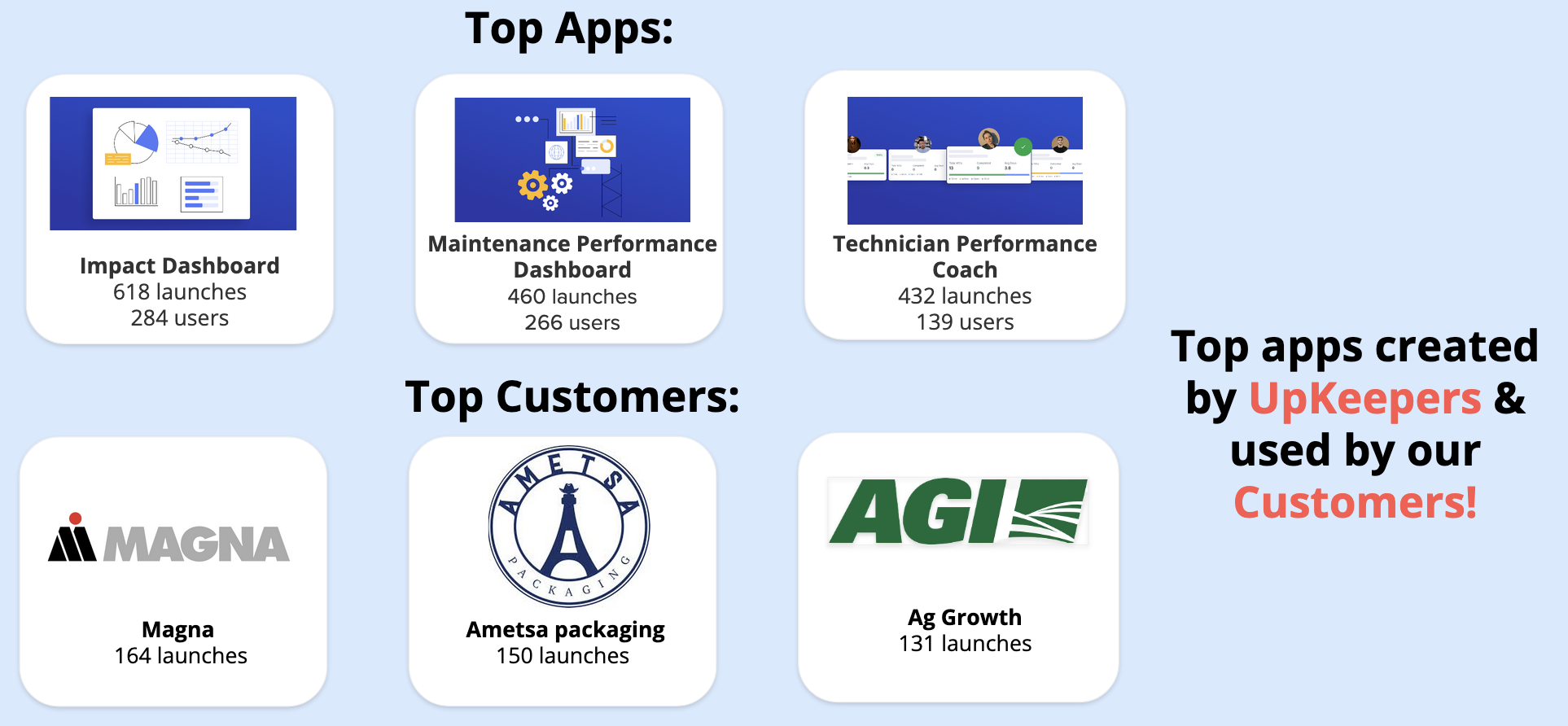
Within a month of launch, UpKeep's maintenance teams had created over 400 custom apps. Here's what they built:
- Custom inspection forms (127 apps): Safety checklists, equipment audits, compliance checks—each tailored to specific facilities and regulations
- Real-time dashboards (89 apps): Equipment downtime tracking, maintenance KPIs, parts inventory status, work order analytics
- Workflow automation (76 apps): Automatic work order creation from sensor data, parts reordering triggers, preventive maintenance scheduling
- Mobile data collection (64 apps): Photo documentation tools, technician time tracking, on-site measurements and readings
- Integration tools (44 apps): Connecting UpKeep data with ERP systems, building management systems, and IoT platforms
The Most Popular Apps #
The top three apps were all variations of "what I wish the software did by default":
-
Equipment Downtime Cost Calculator: A manufacturing plant in Ohio built a dashboard that automatically calculated revenue lost per minute of downtime for each production line. They shared it, and 47 other facilities cloned it within two weeks.
-
Photo-First Work Orders: A healthcare system's maintenance team created a mobile app where technicians could snap a photo, describe the issue verbally, and AI would auto-generate the work order with categorization and priority. Support ticket volume for "help creating work orders" dropped 67%.
-
Vendor Performance Scorecard: A facilities manager at a university built a dashboard tracking response times and quality ratings for external contractors. Other customers used it to negotiate better service level agreements.
Key Metrics: 90.8% Adoption, 89% Day-30 Retention #
The numbers speak for themselves. Within 30 days:
- 90.8% of active UpKeep customers had tried the AI app builder
- 89% retention at day 30—users who built an app kept using it
- 3.2 apps per customer on average
- 34% reduction in support tickets related to "how do I..." and feature requests
User Adoption Timeline #
The rollout followed a pattern we didn't expect:
- Week 1: Early adopters (mostly technical facility managers) built 89 apps, primarily dashboards and reports
- Week 2: Word spread through customer communities. App creation jumped 340% as non-technical users cloned and modified popular apps
- Week 3: Enterprise customers started creating company-wide standards—template apps that their entire organization would deploy
- Week 4: Cross-customer app sharing emerged organically. Manufacturing facilities were learning from healthcare systems, adapting their solutions to different contexts
What Drove Such High Retention? #
Three factors made the difference:
-
Instant value. Traditional customization meant "submit a ticket, wait weeks, hope you described it right." With AI, maintenance managers could describe what they needed in plain English and have a working app in 30 seconds. The first time someone saw their custom dashboard appear, they were hooked.
-
No switching cost. The apps lived inside UpKeep, using their existing data and permissions. Users didn't have to learn new tools, export data, or manage separate systems. It just worked with what they already had.
-
Compounding utility. Every app a customer built made UpKeep more valuable to them specifically. After building 3-4 custom tools, the platform became irreplaceable. This is why 89% were still active at day 30—they'd built themselves into the product.
Real Examples from Maintenance Teams #
Let's look at three actual apps that UpKeep customers built and why they mattered.
Manufacturing Facility: OSHA Compliance Checklist Builder #
The problem: A food processing plant in the Midwest had 23 different pieces of equipment, each with unique OSHA safety inspection requirements. The maintenance manager had been maintaining these in Excel, printing them weekly, and manually tracking completion. Audits were nightmares.
What they built: A mobile inspection app that dynamically generated the right checklist based on equipment ID. Technicians would scan a QR code on the equipment, answer the specific safety questions for that machine, take required photos, and auto-submit to the compliance database.
The impact: Inspection time dropped from 45 minutes to 12 minutes per machine. More importantly, during their next OSHA audit, they pulled up a complete inspection history for any equipment in seconds. They passed with zero violations for the first time in five years.
Time to build: 8 minutes. Previously, custom development like this would have been a 6-8 week project at $30K+.
Healthcare System: Critical Equipment Uptime Dashboard #
The problem: A hospital network's biomedical engineering team managed 1,200+ pieces of critical medical equipment. When an MRI machine or ventilator went down, every minute mattered. But their existing dashboards showed work orders, not what executives cared about: "Which critical equipment is down right now, and how long has it been out?"
What they built: A real-time status board that showed all critical equipment, color-coded by status (green = operational, yellow = maintenance scheduled, red = down), with automatic alerts when anything critical went offline. The dashboard pulled from UpKeep's work order data but reorganized it around equipment criticality and patient impact.
The impact: Mean time to repair dropped 34% because the right people saw problems immediately. More strategically, when they showed this dashboard to hospital administrators during budget meetings, they got approval for two additional biomedical engineers—they finally had data showing the impact of understaffing.
Time to build: 15 minutes, including time to define "critical equipment" parameters.
Property Management: Tenant Maintenance Request Tracker #
The problem: A commercial property management company handled maintenance for 47 buildings. Tenants would submit requests, but there was no visibility into status. The result: duplicate tickets, angry phone calls asking "what's the status?", and strained tenant relationships.
What they built: A tenant-facing dashboard showing all open maintenance requests for their space, with real-time status updates, assigned technician info, and estimated completion times. When UpKeep's technicians updated work orders, tenants saw it instantly.
The impact: Support calls about "ticket status" dropped 78%. Tenant satisfaction scores improved 23 points. Most surprisingly, when leases came up for renewal, tenants who used the tracker renewed at 18% higher rates—they felt like they had a responsive, modern landlord.
Time to build: 12 minutes. They cloned a similar app from another customer and adapted it.
Technical Implementation: How We Kept It Secure #
When you let 1,000 users generate code that runs in your production environment, security isn't optional. Here's how we did it without locking down the experience.
Security Architecture #
The key was making AI-generated apps inherit all of UpKeep's existing security model:
- Sandboxed execution: Every app runs in an isolated WebAssembly environment. Apps can read and write UpKeep data via APIs, but can't access the underlying database, network, or file system directly.
- Inherited permissions: Apps respect the same role-based access control as the rest of UpKeep. If you can't see certain work orders manually, you can't see them in a custom app either. Users can only build apps that access data they already have permission to see.
- Automated code review: Every generated app goes through static analysis before deployment. We check for common vulnerabilities (XSS, SQL injection, data exfiltration attempts) and block anything suspicious.
- Rate limiting: Apps have per-user API quotas to prevent accidental DOS attacks from poorly optimized queries.
- Audit logging: Every app creation, modification, and execution is logged. Compliance teams can see exactly what apps exist, who built them, and what data they access.
Performance at Scale #
With 1,000+ users creating apps, we learned to optimize for the common patterns:
- 95% of apps are dashboards and forms—mostly read operations with simple filters and aggregations
- Template caching: Popular apps get compiled once and reused, rather than regenerating code for every clone
- Query optimization: AI learns to generate efficient database queries by analyzing UpKeep's schema and indexes
- Edge deployment: Apps run on Cloudflare Workers at the edge, with <50ms latency globally
The result: AI-generated apps perform identically to hand-coded features in UpKeep's core product.
Lessons Learned from 1,000 Users #
Deploying AI app building at this scale taught us what actually matters versus what we thought would matter.
What Worked #
Four things drove adoption and retention:
-
Zero-learning onboarding: We didn't make users watch tutorials or read docs. The interface was a text box that said "Describe what you want to build." First-time users were creating apps within 60 seconds of discovering the feature.
-
Template library that grew itself: We seeded 12 starter templates. Within three weeks, users had created 89 templates for others to clone. The best learning material wasn't documentation—it was seeing what other maintenance teams had built.
-
Community sharing with proper attribution: When someone cloned your app, you got credited and could see how many people used it. This created organic competition to build the best tools. The top app creator had 127 clones of their work—they became a power user who gave us invaluable feedback.
-
Apps lived where the work happened: We didn't make users context-switch to a separate "app builder" environment. You could create an app while looking at a work order, immediately test it with real data, and deploy it to your team in one flow.
What We'd Do Differently #
Looking back, we under-invested in a few areas:
- Version control and rollback: Users would modify an app, break it, and have no undo button. We added version history in week 3, but should have launched with it.
- Collaboration features: Multiple people from the same organization would independently build similar apps. We should have surfaced "your teammate built something similar" earlier.
- Usage analytics for app creators: Builders wanted to know "is anyone actually using this?" We added view counts and active user metrics in week 4.
- Cross-organization discovery: Healthcare customers wanted to see what other healthcare customers built, not just anyone's apps. Better categorization and filtering would have helped.
The Business Impact #
The metrics told a clear story: letting customers close the last mile themselves didn't just improve retention—it fundamentally changed UpKeep's business model.
Revenue Metrics #
Six months after launch, the numbers were undeniable:
- Net Revenue Retention: Increased from 108% to 131%. Customers who built apps expanded to higher tiers to support more users and data.
- Churn reduction: Logo churn decreased 41% among customers who built at least one app. When software perfectly fits your workflow, why would you leave?
- Expansion revenue: Grew 156% as customers brought more teams onto the platform. "We started with just maintenance, but once facilities saw our custom apps, they wanted in too."
- Support tickets: Feature requests and "how do I..." tickets dropped 34%. Customers were solving their own problems instead of waiting on support.
More telling than the metrics were the stories. CFOs who had been evaluating competitors stopped their searches. Renewal conversations changed from "justify your price" to "how do we roll this out company-wide?" Several customers became reference accounts, showing prospects the custom tools they'd built—turning the sales process into a demonstration of possibility.
Customer Feedback #
"We were three weeks from churning to a competitor who promised better custom reporting. Then UpKeep released this feature and I built exactly what I needed in 20 minutes. Not only did we renew, we upgraded to bring our entire facilities team onto the platform."
— VP of Operations, Fortune 500 Manufacturing Company
"This is the first software I've used in 30 years of healthcare maintenance that feels like it was built specifically for us. Because it was—by us. I told our CIO that if we ever consider switching CMMS platforms, they'll have to pry this from my cold, dead hands."
— Director of Biomedical Engineering, 12-Hospital Health System
"I'm not technical. I've never written code. But I built a dashboard that automatically calculates our maintenance ROI and shows it to the C-suite every Monday. My boss asked how much we paid for custom development. When I said 'I made it myself in 10 minutes,' his jaw literally dropped."
— Facilities Manager, Commercial Real Estate Portfolio
What's Next: Scaling to 10,000 Users #
UpKeep's deployment proved that customer-facing AI app building works at scale. Now they're rolling it out to their entire customer base—10,000+ organizations managing maintenance worldwide.
The roadmap is driven by what those first 1,000 users requested most:
New Features in Development #
Based on actual customer requests:
- AI app improvement suggestions: "Your dashboard loads slowly because of this query. Here's a faster version" or "82% of users who built apps like this also added this chart."
- Cross-app data flow: Connect multiple apps together. One user builds a data collection form, another consumes that data in a dashboard, a third triggers workflows based on thresholds.
- Mobile-native builder: Currently, apps work on mobile but are built on desktop. Power users want to build and iterate while walking the factory floor.
- Industry template marketplace: Healthcare-specific apps, manufacturing compliance tools, property management dashboards—pre-built by experts in each vertical.
The goal isn't just more features—it's letting customers solve problems UpKeep's engineering team never anticipated. That's the power of solving the last mile at scale.
The 2026 Playbook for SaaS Retention #
Here's what UpKeep's deployment taught us about winning in the age of AI-powered customization:
The last mile problem is now solvable. For 30 years, B2B SaaS companies had to choose: build generic software that works for everyone but delights no one, or do expensive custom development that doesn't scale. AI eliminated that trade-off. Customers can now solve the last mile themselves, instantly.
Retention is about fit, not features. UpKeep didn't win by building more features than competitors. They won by letting customers build their own perfect fit. Software that molds to your exact workflow is nearly impossible to replace.
The switching cost is creation. Every custom app a customer builds is investment—not in learning your product, but in making it irreplaceable to them. After building 3-4 apps, the cost of switching isn't "retraining our team," it's "rebuilding all our custom tools."
In 2026, the SaaS companies that thrive aren't those with the most features out of the box. They're the ones that empower customers to close the last mile themselves—turning generic software into something that feels custom-built, without the custom-built cost or timeline.
Want to Deploy AI App Building for Your Customers? #
If you're building B2B SaaS and struggling with the same challenges—feature requests piling up, customers churning because your product is "close but not quite right," expansion revenue stalling—customer-facing AI app building might be your answer.
UpKeep proved it works at scale. The technology exists. The question is: will you give your customers the power to solve the last mile, or will a competitor do it first?
Get started with Gigacatalyst or schedule a demo to see how customer-facing vibe coding can transform your B2B SaaS product.